Aspect Ratio Calculator
Instantly calculate and convert aspect ratios for any project. Whether you're resizing images, editing video, or working on a design, our ratio calculator ensures your dimensions are pixel-perfect every time.
Live Shape Visualizer
See how your calculated aspect ratio proportions look physically in real time:
Why Our Calculator Is a Big Help
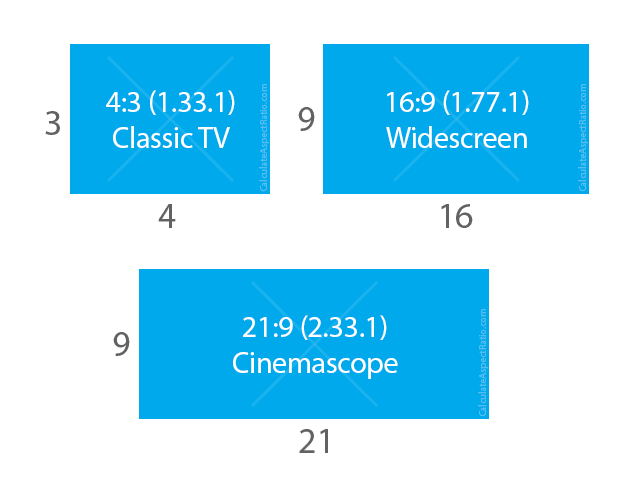
Every picture and video has a shape. That shape is its aspect ratio. It tells you how wide something is compared to how tall it is.
If you change the width, the height must change in the same way. Otherwise the picture stretches or squishes. This is important on TVs, monitors, and phones.
Our aspect ratio calculator does the math for you. Just type in one number, and it instantly gives you the other. No headaches and no guesswork, perfect for resizing photos, videos, or design projects.
Frequently Asked Questions
What is aspect ratio?
Aspect ratio is the width-to-height proportion of an image or video. Written as "16:9", it means 16 units wide for every 9 units tall. It's the shape of your picture, widescreen, square, or somewhere between.
How do I use this calculator?
Three simple steps:
- Pick a preset (like 16:9) or type your own ratio
- Enter either the width OR height you need
- Get the matching dimension instantly, no math required
Which ratio should I choose?
- 16:9 Widescreen - YouTube, modern TVs, presentations
- 9:16 Vertical - TikTok, Instagram Reels, mobile videos
- 21:9 Ultrawide - Panoramic gaming monitors, cinemascope films
- 3:2 Photo - DSLR photography, tablet layouts
- 4:3 Standard - Retro TV footage, classic CRT monitors
- 1:1 Square - Profile avatars, social media feed grids
Why does aspect ratio matter?
Wrong ratios cause stretching or squishing. Ever seen a photo where people look too tall or too wide? That's a ratio mismatch. The right ratio keeps images looking natural and professional.
What's the difference between ratio and pixels?
Ratio is the shape (16:9). Pixels are the size (1920x1080). The ratio stays the same whether your image is small (320x180) or large (3840x2160), it's always 16:9.
Should I crop or pad my image?
- Crop: Cuts edges to fill the frame (use when the center is most important)
- Pad: Adds black bars to keep everything visible (use when you can't lose any content)
Can I use any custom ratio?
Yes. Select "Custom" from the presets and enter any numbers you need, useful for social media banners, print work, or special projects.
Learn more: Wikipedia: Aspect Ratio
What is my aspect ratio?
Enter your width and height in pixels into the calculator above and it shows the simplified ratio instantly. For example, 1920x1080 is 16:9, 1024x768 is 4:3 and 1080x1350 is 4:5.
What is the 4:5 aspect ratio in pixels?
The standard 4:5 size is 1080x1350 pixels, used for Instagram portrait posts. Use our 4:5 calculator to find any custom 4:5 dimension.
Can I use the calculator for physical sizes like inches or centimeters?
Yes. Enter the width and height of any screen or print in the same unit (inches or centimeters) and the calculator finds the matching dimension in that same unit, so the shape stays correct.
Common Ratios & Tools
While you can calculate any custom ratio, most content uses standard formats. Here are the most common:
- 16:9 Widescreen Ratio: The standard for modern widescreen TVs, monitors, and online video platforms like YouTube. Use our 16:9 ratio calculator for HD content, or learn about standard formats in our video aspect ratio guide.
- 21:9 Ultrawide Ratio: The standard "ultrawide" format for panoramic computer monitors and cinema screens. Use our 21:9 ratio calculator to scale wide desktop wallpapers and gameplay layouts.
- 9:16 Vertical Ratio: The vertical standard for smartphones and mobile micro-content. Use our 9:16 calculator for TikTok, Instagram Reels, and YouTube Shorts.
- 4:3 Standard Ratio: The classic "fullscreen" format for older televisions and computer monitors. Our 4:3 calculator is perfect for retro projects.
- 3:2 DSLR Ratio: Commonly found in 35mm photography and DSLR camera sensors. Calculate pixel resolutions with our 3:2 calculator, or read our image aspect ratio and photo size guide.
- 1:1 Square Ratio: The classic square format for avatars and social feeds. Use our 1:1 calculator to size clean Instagram posts and app icons.
Smartphone Screen Ratios
Today's phones have screens that are even taller than 16:9. For example, the iPhone 14 has a ratio of roughly 19.5:9. This extra height gives you more room for apps and scrolling without making the phone wider. Type 19.5 and 9 into the custom preset above to see its shape!
Oppenheimer Aspect Ratio
The film Oppenheimer uses two different aspect ratios. Director Christopher Nolan shot with IMAX cameras to create distinct visual experiences.
1.43:1 IMAX ratio: For epic, historical scenes (tall, immersive frame)
2.20:1 ratio: For intimate, character-focused moments (wider frame)
Most non-IMAX theaters show the entire movie in a wider format, cropping the tall IMAX scenes. Fans call this "Croppenheimer". To see the full effect, watch it in 70mm IMAX.
IMAX Official Site explains format differences.